
OpusClip alternative
ShortClip vs OpusClip
Both tools turn a long video into vertical clips with captions, and both start with 60 free minutes a month. They differ in what the free plan lets you do, what 300 minutes a month costs, and how much of the publishing workflow lives inside the tool.
Prices checked on on OpusClip's official site. Sources
60 min/month, watermarked. Paste a YouTube link or upload a file.
Short answer
- You want a social scheduler, AI B-roll, a virality score or team seats in one place: OpusClip
- You want to edit captions and titles on the free plan, or pay less for the same monthly minutes: ShortClip
- Not sure: run the same video through both free plans and count the clips you would actually post
ShortClip vs OpusClip at a glance
| ShortClip | OpusClip | |
|---|---|---|
| Pricing model | ShortClipMinutes of source video you convert, refilled monthly | OpusClipCredits: 1 credit per minute of imported video (partial minutes round down) |
| Free plan | ShortClip60 minutes of video a month, watermarked exports, projects kept for 24 hours | OpusClip60 credits a month, watermark, no editing, clips exportable for 3 days, up to 1080p |
| Paid plans, monthly | ShortClipPro $12/mo (150 min, monthly only); Creator $23/mo or $138/yr (300 min) | OpusClipStarter $15/mo (150 credits); Pro $29/mo per pack (300 credits); Business custom |
| Yearly billing | ShortClipCreator $138/yr ($11.50/mo); Pro is monthly only | OpusClipPro $174/yr ($14.50/mo) per pack; Starter is monthly only |
| Languages | ShortClipCaptions and titles in the language spoken in the video (detected automatically). Every plan can translate titles and captions into 101 languages | OpusClipAI animated captions in 20+ languages; video dubbing on Pro |
| Captions and titles | ShortClipAuto captions split at natural pauses, plus an AI two-line title on every clip | OpusClipAnimated caption templates with emoji and keyword highlights; speaker-based caption colors |
| Editing | ShortClipBrowser editor: fix caption and title text, move cut points, change layout and styles, save up to 30 style presets. Creator plan adds silence removal and custom font uploads | OpusClipNo editing on Free. Starter: editor, filler and silence removal. Pro: AI B-roll, custom fonts, export to Premiere Pro and DaVinci Resolve |
| Posting to social platforms | ShortClipYouTube: Creator and up post to their channel from ShortClip, now or at a scheduled time. TikTok, Instagram and others: download the MP4 and upload it yourself | OpusClipStarter: auto post to YouTube Shorts, TikTok and Instagram Reels. Pro: social media scheduler |
| Video input | ShortClipYouTube link or file upload (up to 10 GB and 6 hours; one run covers up to 3 hours of it) | OpusClipUpload (up to 10 GB per video) or a video link; Pro imports from 10+ sources |
| Watermark | ShortClipFree plan exports carry a watermark; Pro and up export without one | OpusClipFree plan has a watermark; Starter and up export without one |
The same 300 minutes a month, priced side by side
OpusClip counts credits and ShortClip counts minutes, but they measure the same thing: one credit is one minute of the video you import. That makes the plans easy to line up. An OpusClip Pro pack and ShortClip Creator both give you 300 minutes a month.
The free plans also match on volume: 60 minutes a month each. The difference is what you can do with them. OpusClip Free has no editing and clips stop being exportable after 3 days. ShortClip Free includes the full editor, and projects are kept for 24 hours. Both put a watermark on free exports.
OpusClip lists lower prices in some countries. The figures below are the US prices on its pricing page.
| OpusClip Pro (1 pack) | ShortClip Creator | |
|---|---|---|
| Minutes a month | OpusClip Pro (1 pack)300 credits | ShortClip Creator300 minutes |
| Billed monthly | OpusClip Pro (1 pack)$29/mo | ShortClip Creator$23/mo |
| Billed yearly | OpusClip Pro (1 pack)$174/yr ($14.50/mo) | ShortClip Creator$138/yr ($11.50/mo) |
| Unused minutes | OpusClip Pro (1 pack)Roll over for 1 month (monthly) or 2 months (yearly) | ShortClip CreatorRefill every month (no rollover) |
| Also included | OpusClip Pro (1 pack)2 team seats, social scheduler, AI B-roll, video dubbing | ShortClip CreatorSilence removal, custom fonts; translation into 101 languages (every plan) |
- Need fewer minutes? ShortClip Pro is $12/mo for 150 minutes; OpusClip Starter is $15/mo for 150 credits.
- Need more than 300 minutes? OpusClip sells extra Pro packs. ShortClip goes to a custom Enterprise plan above Creator.
OpusClip and ShortClip prices
Monthly and yearly prices as each pricing page lists them, in US dollars. Taxes, regional prices and promotions can change what you pay at checkout.
| Plan | Billed monthly | Billed yearly |
|---|---|---|
| Free: 60 credits a month (1 credit = 1 minute of video). Watermark, no editing, clips exportable for 3 days | Billed monthly$0 | Billed yearly— |
| Starter: 150 credits a month. Monthly billing only | Billed monthly$15/mo | Billed yearlyNot offered |
| Pro: 300 credits a month per pack (3,600 a year on yearly billing). Price per pack; 2 team seats | Billed monthly$29/mo | Billed yearly$174/yr ($14.50/mo) |
| Business: Custom. Contact sales | Billed monthlyCustom | Billed yearlyNot offered |
| Plan | Billed monthly | Billed yearly |
|---|---|---|
| Free: 60 minutes a month, watermarked exports | Billed monthly$0 | Billed yearly— |
| Pro: 150 minutes a month, no watermark, projects kept 7 days | Billed monthly$12/mo | Billed yearlyNot offered |
| Creator: 300 minutes a month, silence removal, custom fonts, projects kept 30 days | Billed monthly$23/mo | Billed yearly$138/yr ($11.50/mo) |
| Enterprise: high-volume conversion, dedicated support | Billed monthlyCustom | Billed yearlyCustom |
Which one should you choose?
Both are good tools. They are built for different jobs, so here is where each one is the better pick.
Choose OpusClip if
- You want to schedule and post clips without leaving the tool
- You want AI B-roll, motion graphics, video dubbing or a virality score
- A team shares one workspace, or you export to Premiere Pro or DaVinci Resolve
- Unused minutes should roll over to the next month
Choose ShortClip if
- You want to try the editor before you pay: the free plan includes it
- You need about 150 to 300 minutes a month and want the lower bill
- You want a clean two-line title on every clip, generated from what the speaker said
- You publish in more than one language: every ShortClip plan translates titles and captions into 101 languages
What ShortClip makes from a long video
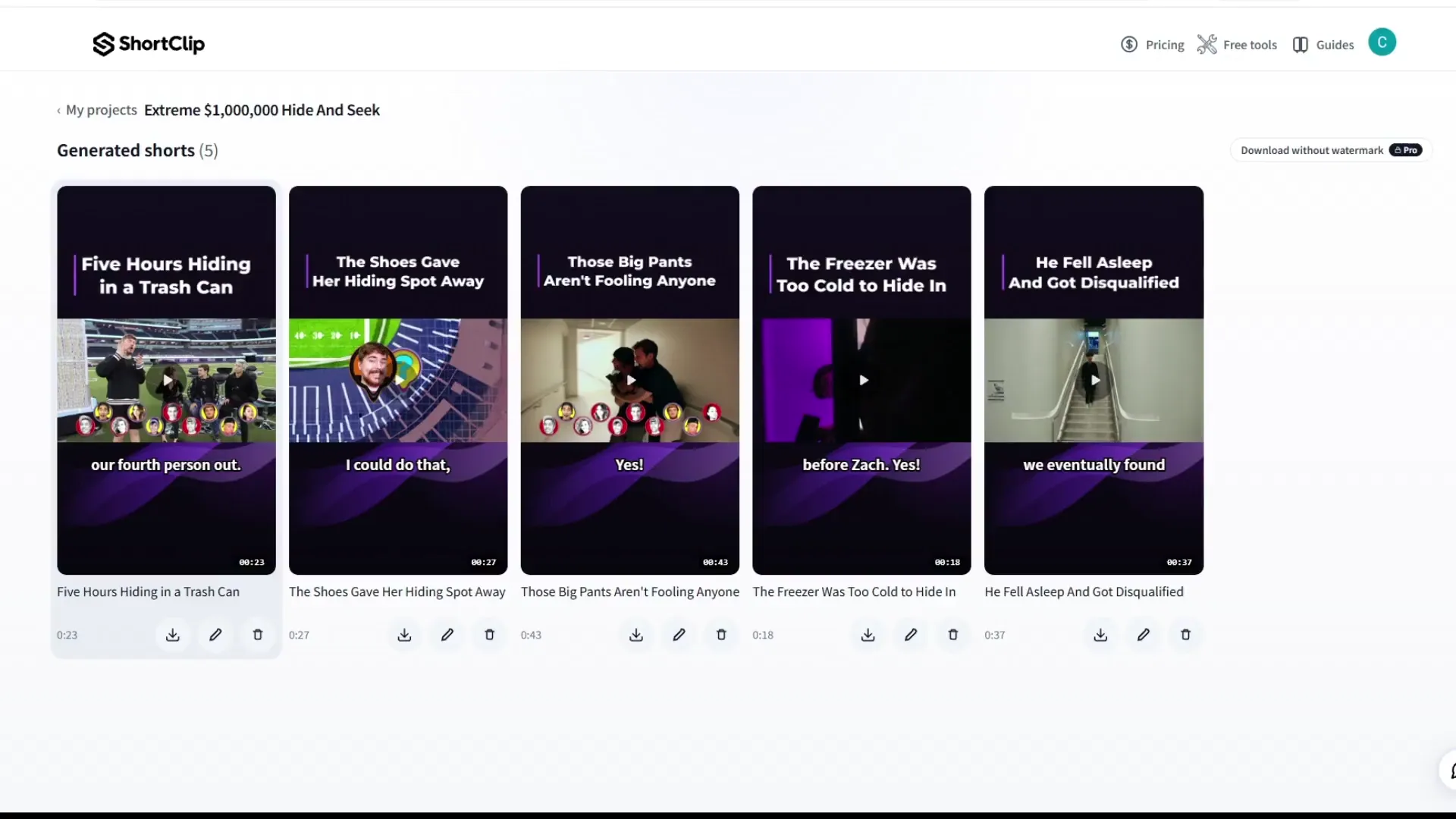
Real clips from our sample videos: ShortClip picked the moments, cut them to 9:16, added the captions and wrote the two-line title. Tap to play.
Questions
Is ShortClip a free OpusClip alternative?
ShortClip has a free plan with 60 minutes of video a month, the same volume as OpusClip Free. Exports carry a watermark on both. ShortClip Free includes the editor; OpusClip Free does not.
Can ShortClip post to TikTok or YouTube for me?
YouTube yes, TikTok no. On Creator and up you can post or schedule a short to your YouTube channel from ShortClip. For TikTok you download the MP4 and upload it yourself. If built-in posting to several networks matters to you, OpusClip Starter and Pro include it.
How do OpusClip credits compare to ShortClip minutes?
One OpusClip credit is one minute of imported video, so 300 credits and 300 ShortClip minutes cover the same amount of footage.
Sources and how we checked
OpusClip facts on this page come from OpusClip's own pages, read on . Where a page did not state something, we left it out. ShortClip facts come from our current plans. Prices and features change; check the official pages before you buy.
- OpusClip pricing (plans, free plan, compare table) (https://www.opus.pro/pricing)
- OpusClip help: how credits are consumed (https://help.opus.pro/docs/article/how-are-credits-consumed)
More comparisons and guides
- ShortClip vs VizardVizard is cheaper per minute once you process hours of video every month. ShortClip is the smaller bill when you need 150 to 300 minutes.
- ShortClip vs KlapKlap charges per clip and ignores source length; ShortClip charges per minute of source. Long weekly podcasts favor Klap, short weekly videos favor ShortClip.
- ShortClip vs SubmagicSubmagic is a caption and effects editor for videos that are already short; ShortClip starts from the long recording. Many creators would use one for each job.
Try ShortClip on your own video
60 free minutes every month. Paste a YouTube link or upload a file, and get vertical clips with captions and a two-line title.
Try ShortClip free