
Vizard alternative
ShortClip vs Vizard
Vizard and ShortClip both bill by the minute of video you put in, so the honest way to compare them is by your monthly volume. One is the smaller bill for light use; the other gets cheaper per minute the more you process.
Prices checked on on Vizard's official site. Sources
60 min/month, watermarked. Paste a YouTube link or upload a file.
Short answer
- You process several hours of video a month, post to many social accounts, or need 4K: Vizard
- You need up to 300 minutes a month and want the lowest monthly bill: ShortClip
- Both free plans give you 60 minutes a month, so you can test each on the same video first
ShortClip vs Vizard at a glance
| ShortClip | Vizard | |
|---|---|---|
| Pricing model | ShortClipMinutes of source video you convert, refilled monthly | VizardCredits: 1 credit per minute of video processed, shared between clipping and the Vizard Agent; unused credits roll over for 2 months |
| Free plan | ShortClip60 minutes of video a month, watermarked exports, projects kept for 24 hours | Vizard60 credits a month, watermark, 720p export up to 10 minutes long, uploads up to 60 minutes and 1 GB, storage expires after 3 days |
| Paid plans, monthly | ShortClipPro $12/mo (150 min, monthly only); Creator $23/mo or $138/yr (300 min) | VizardCreator $29/mo; Business $39/mo (each 600 credits a month at the lowest tier) |
| Yearly billing | ShortClipCreator $138/yr ($11.50/mo); Pro is monthly only | VizardCreator $174/yr ($14.50/mo); Business $234/yr ($19.50/mo) |
| Languages | ShortClipCaptions and titles in the language spoken in the video (detected automatically). Every plan can translate titles and captions into 101 languages | VizardSubtitles in 50+ languages; subtitle translation into 180+ languages on paid plans |
| Captions and titles | ShortClipAuto captions split at natural pauses, plus an AI two-line title on every clip | VizardAnimated subtitles, auto emojis and keyword highlights on every plan |
| Editing | ShortClipBrowser editor: fix caption and title text, move cut points, change layout and styles, save up to 30 style presets. Creator plan adds silence removal and custom font uploads | VizardFull video editor on every plan, auto B-roll, custom templates; brand kit and custom fonts on Business |
| Posting to social platforms | ShortClipYouTube: Creator and up post to their channel from ShortClip, now or at a scheduled time. TikTok, Instagram and others: download the MP4 and upload it yourself | VizardSchedules and posts to TikTok, YouTube, Instagram, Facebook Pages, X and LinkedIn; 1 social account on Free, 6 on Creator, 20 on Business |
| Video input | ShortClipYouTube link or file upload (up to 10 GB and 6 hours; one run covers up to 3 hours of it) | VizardUploads up to 10 hours and 30 GB on paid plans (60 minutes and 1 GB on Free); export up to 4K on paid plans |
| Watermark | ShortClipFree plan exports carry a watermark; Pro and up export without one | VizardFree plan has a watermark; Creator and Business export without one |
Which is cheaper at your monthly volume?
Both tools charge for the length of the video you feed in, not for the clips that come out. So the useful question is: how many minutes of long video do you process in a typical month?
The table uses each plan's list price and its smallest allowance that covers the volume. Vizard's Creator plan starts at 600 credits (minutes) a month, so it costs the same whether you use 150 or 600 of them. ShortClip's paid plans are smaller and cheaper, and stop at 300 minutes before Enterprise.
| Minutes of video a month | Vizard | ShortClip |
|---|---|---|
| Up to 60 | VizardFree (watermark, 720p) | ShortClipFree (watermark) |
| Up to 150 | VizardCreator $29/mo, or $14.50/mo billed yearly | ShortClipPro $12/mo (monthly only) |
| Up to 300 | VizardCreator $29/mo, or $14.50/mo billed yearly | ShortClipCreator $23/mo, or $11.50/mo billed yearly |
| Up to 600 | VizardCreator $29/mo, or $14.50/mo billed yearly | ShortClipEnterprise (custom pricing) |
| Cost per minute at full use | Vizard4.8¢ monthly, 2.4¢ yearly (Creator, 600 min) | ShortClip8.0¢ (Pro); 7.7¢ monthly, 3.8¢ yearly (Creator) |
- Below 300 minutes a month, ShortClip is the smaller bill: $12 instead of $29 for 150 minutes, or $11.50 instead of $14.50 a month on yearly billing.
- If you would use all 600 Vizard credits, Vizard is cheaper per minute. ShortClip does not sell a self-serve plan that large.
- Unused Vizard credits roll over for 2 months; ShortClip minutes refill every month and do not roll over.
Vizard and ShortClip prices
Monthly and yearly prices as each pricing page lists them, in US dollars. Taxes, regional prices and promotions can change what you pay at checkout.
| Plan | Billed monthly | Billed yearly |
|---|---|---|
| Free: 60 credits a month (1 credit = 1 minute of video). Watermark, 720p export, 3-day storage | Billed monthly$0 | Billed yearly— |
| Creator: 600 credits a month at the lowest tier (up to 6,200 at higher tiers) | Billed monthly$29/mo | Billed yearly$174/yr ($14.50/mo) |
| Business: 600 credits a month at the lowest tier (up to 6,200 at higher tiers). Extra team members are billed per seat | Billed monthly$39/mo | Billed yearly$234/yr ($19.50/mo) |
| Plan | Billed monthly | Billed yearly |
|---|---|---|
| Free: 60 minutes a month, watermarked exports | Billed monthly$0 | Billed yearly— |
| Pro: 150 minutes a month, no watermark, projects kept 7 days | Billed monthly$12/mo | Billed yearlyNot offered |
| Creator: 300 minutes a month, silence removal, custom fonts, projects kept 30 days | Billed monthly$23/mo | Billed yearly$138/yr ($11.50/mo) |
| Enterprise: high-volume conversion, dedicated support | Billed monthlyCustom | Billed yearlyCustom |
Which one should you choose?
Both are good tools. They are built for different jobs, so here is where each one is the better pick.
Choose Vizard if
- You process more than 300 minutes of video a month
- You want to schedule posts to TikTok, YouTube, Instagram, Facebook, X and LinkedIn from one place
- You need 4K export, uploads up to 10 hours, or a shared team workspace
- You translate subtitles into many languages and want the widest list
Choose ShortClip if
- You process up to 300 minutes a month and want to pay less for it
- You want a plan under $15: Pro is $12/mo
- You want an AI two-line title burned into every clip, built from what the speaker said
- You want to work with long recordings on the free plan: uploads up to 10 GB (Vizard Free stops at 60 minutes and 1 GB per upload)
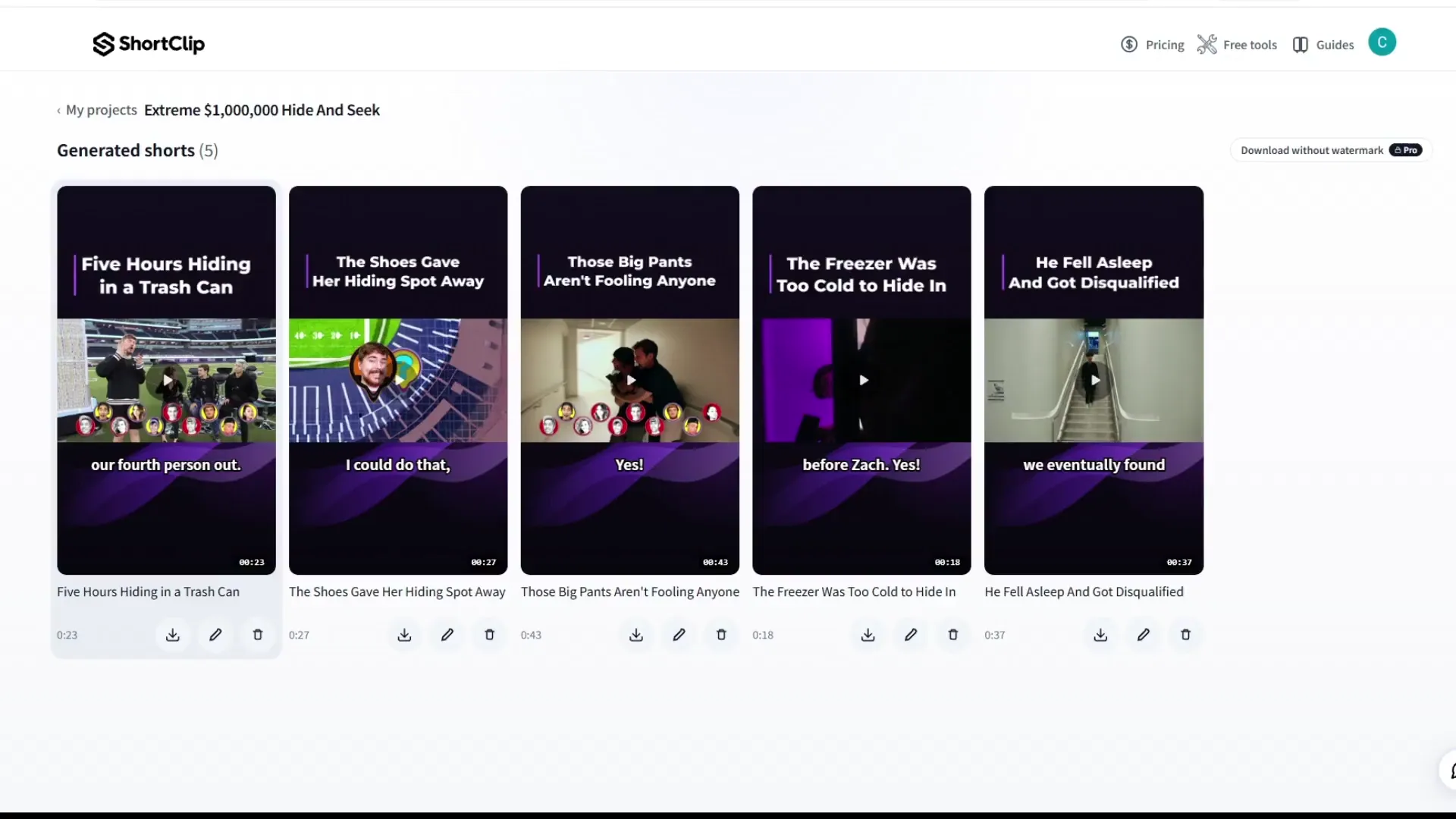
What ShortClip makes from a long video
Real clips from our sample videos: ShortClip picked the moments, cut them to 9:16, added the captions and wrote the two-line title. Tap to play.
Questions
Is ShortClip cheaper than Vizard?
For up to 300 minutes of video a month, yes: ShortClip Pro is $12/mo and Creator is $23/mo ($11.50/mo yearly), against $29/mo ($14.50/mo yearly) for Vizard Creator. If you use Vizard's full 600 credits, Vizard costs less per minute.
Do both free plans have a watermark?
Yes. Both add a watermark to free exports, and both give you 60 minutes of video a month. Vizard Free also limits exports to 720p.
Can ShortClip schedule posts like Vizard?
For YouTube only: on Creator and up you can post a short now or schedule it on your YouTube channel. There is no posting calendar for TikTok, Instagram or other networks; you download the MP4 and upload it there yourself.
Sources and how we checked
Vizard facts on this page come from Vizard's own pages, read on . Where a page did not state something, we left it out. ShortClip facts come from our current plans. Prices and features change; check the official pages before you buy.
- Vizard pricing (plans and "Compare plan" table) (https://vizard.ai/pricing)
- Vizard help: how credits are used for AI processing (https://help.vizard.ai/en/articles/12017624-how-credits-are-used-for-ai-processing)
- Vizard help: auto-schedule posts of AI clips (https://help.vizard.ai/en/articles/10848181-auto-schedule-post-ai-clips)
- Vizard auto subtitle generator (languages) (https://vizard.ai/tools/auto-subtitle-generator-online)
More comparisons and guides
- ShortClip vs OpusClipBoth give you 60 free minutes a month. OpusClip adds a scheduler, B-roll and team seats; ShortClip lets you edit on the free plan and costs less for the same 300 minutes.
- ShortClip vs KlapKlap charges per clip and ignores source length; ShortClip charges per minute of source. Long weekly podcasts favor Klap, short weekly videos favor ShortClip.
- ShortClip vs SubmagicSubmagic is a caption and effects editor for videos that are already short; ShortClip starts from the long recording. Many creators would use one for each job.
Try ShortClip on your own video
60 free minutes every month. Paste a YouTube link or upload a file, and get vertical clips with captions and a two-line title.
Try ShortClip free