
Submagic alternative
ShortClip vs Submagic
Submagic is built around captioning and polishing short videos, with long-video clipping (Magic Clips) as one feature. ShortClip is built the other way round: you start from a long recording and get finished vertical clips. Which one fits depends on what you film.
Prices checked on on Submagic's official site. Sources
60 min/month, watermarked. Paste a YouTube link or upload a file.
Short answer
- You film short vertical videos yourself and want styled captions, B-roll, zooms and effects: Submagic
- You start from long recordings (interviews, podcasts, webinars) and want clips with captions and titles: ShortClip
- You can use both: clip the long video in ShortClip, then polish a favourite in Submagic
ShortClip vs Submagic at a glance
| ShortClip | Submagic | |
|---|---|---|
| Pricing model | ShortClipMinutes of source video you convert, refilled monthly | SubmagicCounted per video: captioned short videos (with a maximum length) and long videos clipped by Magic Clips, a set number of each per month |
| Free plan | ShortClip60 minutes of video a month, watermarked exports, projects kept for 24 hours | Submagic15 credits a month, enough for one Magic Clips run (8 credits); exporting needs a paid plan |
| Paid plans, monthly | ShortClipPro $12/mo (150 min, monthly only); Creator $23/mo or $138/yr (300 min) | SubmagicStarter $19/mo; Pro $39/mo; Business $69/mo; Custom on request |
| Yearly billing | ShortClipCreator $138/yr ($11.50/mo); Pro is monthly only | SubmagicStarter $144/yr ($12/mo); Pro $276/yr ($23/mo); Business $492/yr ($41/mo) |
| Languages | ShortClipCaptions and titles in the language spoken in the video (detected automatically). Every plan can translate titles and captions into 101 languages | SubmagicTranscription in 118 languages, captions in the spoken language; translation into 38 languages on Pro and Business |
| Captions and titles | ShortClipAuto captions split at natural pauses, plus an AI two-line title on every clip | SubmagicStandard caption templates on Starter, all templates from Pro; your own templates on Pro (3) and Business (30); AI hook title |
| Editing | ShortClipBrowser editor: fix caption and title text, move cut points, change layout and styles, save up to 30 style presets. Creator plan adds silence removal and custom font uploads | SubmagicText-based trimming, b-rolls, auto-zoom, transitions; from Pro: remove bad takes and silences, clean audio, brand kit |
| Posting to social platforms | ShortClipYouTube: Creator and up post to their channel from ShortClip, now or at a scheduled time. TikTok, Instagram and others: download the MP4 and upload it yourself | SubmagicPublishes to TikTok, Instagram and YouTube Shorts; scheduling needs Pro or Business. LinkedIn, Facebook and X are listed as coming soon |
| Video input | ShortClipYouTube link or file upload (up to 10 GB and 6 hours; one run covers up to 3 hours of it) | SubmagicUpload, Google Drive or a YouTube link (YouTube links for Magic Clips only); Magic Clips takes sources up to 3 hours |
| Watermark | ShortClipFree plan exports carry a watermark; Pro and up export without one | SubmagicPaid plans export without a watermark; the free plan cannot export |
Start from a long recording, or from a short video?
Submagic's plans are built around short videos you already have: Starter captions 15 videos a month of up to 2 minutes each, Business 100 videos of up to 30 minutes. Clipping a long video is a separate, smaller allowance (5, 15 or 37 long videos a month).
ShortClip only does the long-to-short job, and measures it in minutes: a 150-minute month on Pro could be one long webinar or five half-hour interviews. Every clip comes with captions and an AI two-line title you can edit in the browser.
| What you have | Better fit | Why |
|---|---|---|
| Vertical videos you filmed yourself, under a few minutes | Better fitSubmagic | WhyCaption templates, B-roll, zooms and sound effects on a video that is already short |
| A long interview, podcast or webinar | Better fitShortClip | WhyFinds the clips, cuts them vertical, and adds captions and a two-line title |
| A long video and you want heavy styling on the best clip | Better fitBoth | WhyClip in ShortClip, then style the favourite in Submagic |
| A handful of long videos a month on a tight budget | Better fitCompare both | WhySubmagic Starter clips 5 long videos for $12/mo billed yearly; ShortClip Creator covers 300 minutes for $11.50/mo billed yearly |
Submagic and ShortClip prices
Monthly and yearly prices as each pricing page lists them, in US dollars. Taxes, regional prices and promotions can change what you pay at checkout.
| Plan | Billed monthly | Billed yearly |
|---|---|---|
| Free: 15 credits a month (one Magic Clips run costs 8). Exporting clips needs a paid plan | Billed monthly$0 | Billed yearly— |
| Starter: 15 captioned videos (up to 2 min each) and 5 long videos clipped a month | Billed monthly$19/mo | Billed yearly$144/yr ($12/mo) |
| Pro: 40 captioned videos (up to 5 min each) and 15 long videos clipped a month | Billed monthly$39/mo | Billed yearly$276/yr ($23/mo) |
| Business: 100 captioned videos (up to 30 min each) and 37 long videos clipped a month | Billed monthly$69/mo | Billed yearly$492/yr ($41/mo) |
| Plan | Billed monthly | Billed yearly |
|---|---|---|
| Free: 60 minutes a month, watermarked exports | Billed monthly$0 | Billed yearly— |
| Pro: 150 minutes a month, no watermark, projects kept 7 days | Billed monthly$12/mo | Billed yearlyNot offered |
| Creator: 300 minutes a month, silence removal, custom fonts, projects kept 30 days | Billed monthly$23/mo | Billed yearly$138/yr ($11.50/mo) |
| Enterprise: high-volume conversion, dedicated support | Billed monthlyCustom | Billed yearlyCustom |
Which one should you choose?
Both are good tools. They are built for different jobs, so here is where each one is the better pick.
Choose Submagic if
- Most of your content is short vertical video you filmed yourself
- You want many caption styles, B-roll, auto-zoom, transitions and sound effects
- You want to publish to TikTok, Instagram and YouTube from the editor
- You need an API for captioning at scale
Choose ShortClip if
- You start from long recordings and want the clipping done for you
- You want to download clips on the free plan before you pay (with a watermark)
- Your source videos run longer than 3 hours (ShortClip accepts up to 6 hours per file)
- You want titles and captions translated into one of 101 languages (on every plan)
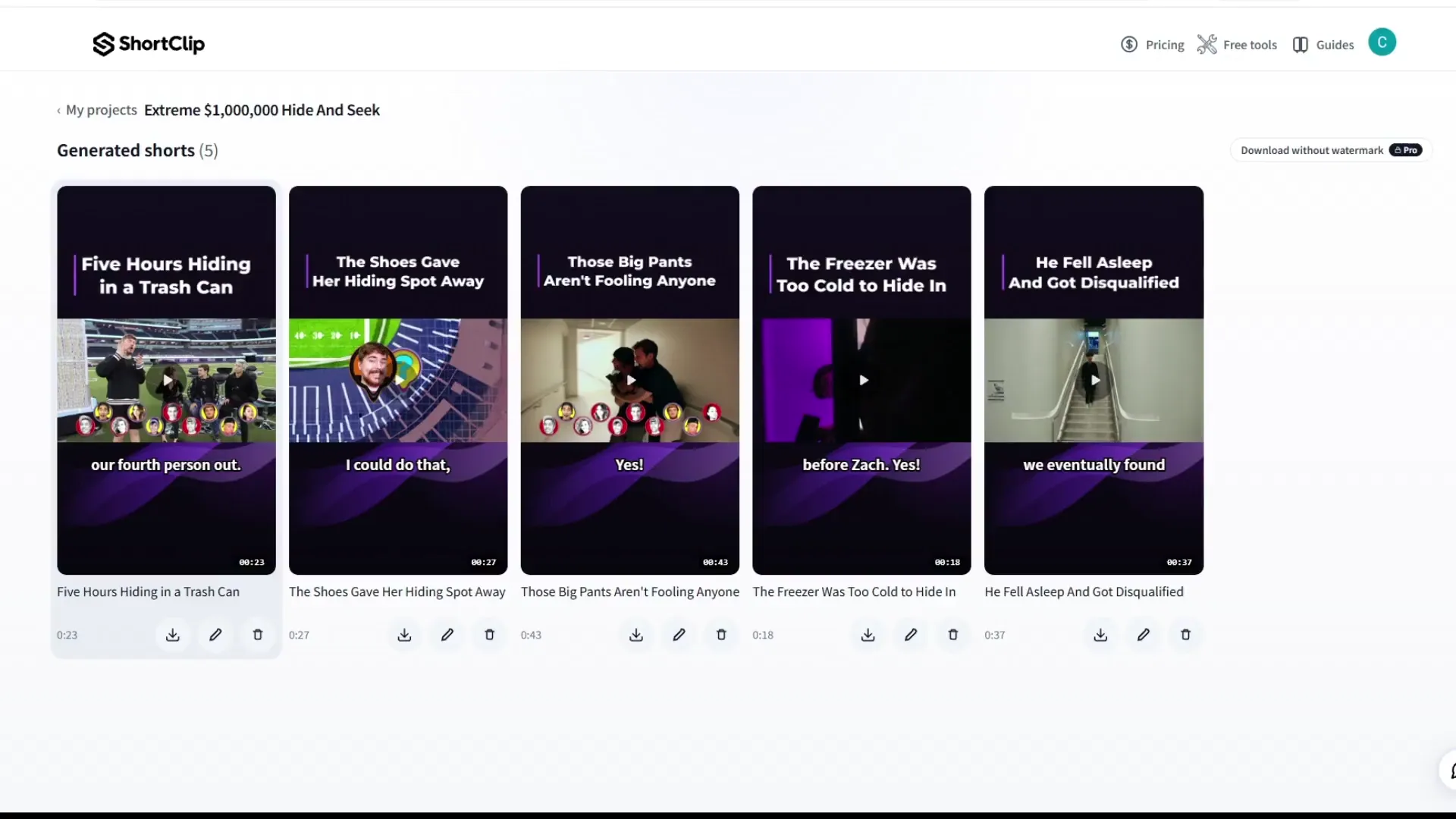
What ShortClip makes from a long video
Real clips from our sample videos: ShortClip picked the moments, cut them to 9:16, added the captions and wrote the two-line title. Tap to play.
Questions
Can Submagic turn a long video into shorts?
Yes, with Magic Clips, which takes videos up to 3 hours. Each plan includes a set number of long videos a month (5 on Starter, 15 on Pro, 37 on Business).
Is there a free Submagic alternative for long videos?
ShortClip Free converts 60 minutes of video a month into clips you can download with a watermark. Submagic's free credits cover one Magic Clips run, and exporting needs a paid plan.
Does ShortClip have animated caption styles like Submagic?
ShortClip has caption and title style templates and lets you save up to 30 of your own presets, but it does not offer Submagic's range of effects such as B-roll, auto-zoom or sound effects.
Sources and how we checked
Submagic facts on this page come from Submagic's own pages, read on . Where a page did not state something, we left it out. ShortClip facts come from our current plans. Prices and features change; check the official pages before you buy.
- Submagic pricing (plans and "Compare plans and features") (https://www.submagic.co/pricing)
- Submagic Magic Clips (long-video clipping, languages, free credits) (https://www.submagic.co/features/magic-clips)
- Submagic social media scheduler (platforms) (https://www.submagic.co/social-media-scheduler)
More comparisons and guides
- ShortClip vs OpusClipBoth give you 60 free minutes a month. OpusClip adds a scheduler, B-roll and team seats; ShortClip lets you edit on the free plan and costs less for the same 300 minutes.
- ShortClip vs VizardVizard is cheaper per minute once you process hours of video every month. ShortClip is the smaller bill when you need 150 to 300 minutes.
- ShortClip vs KlapKlap charges per clip and ignores source length; ShortClip charges per minute of source. Long weekly podcasts favor Klap, short weekly videos favor ShortClip.
Try ShortClip on your own video
60 free minutes every month. Paste a YouTube link or upload a file, and get vertical clips with captions and a two-line title.
Try ShortClip free